
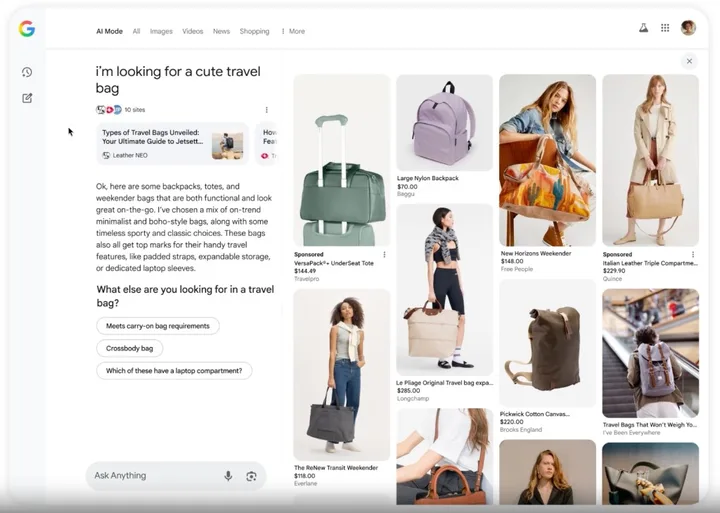
Google AI Mode turns product search from a list of links into a conversation. Gemini interprets the shopper's question, query fan-out breaks it into related searches, and Shopping Graph supplies products. All three layers run on the data in your Merchant Center feed, so completeness and freshness decide visibility.
Key takeaways
- Product discovery in Google Search has moved from keywords to conversational queries, visual search, and follow-up questions. Queries in AI Mode are on average about three times longer than classic ones.
- Visibility in AI results depends on product data. Shopping Graph holds more than 60 billion offers, with more than 2 billion refreshed every hour [1].
- Shopping is becoming visual. Google Lens records more than 25 billion searches a month, and roughly one in five has shopping intent [2].
- AI Mode has been available in Poland since October 2025, but it does not yet pull Shopping Graph data for Polish results. Shopping queries therefore end in citations and store links rather than panels of specific product offers. Google rolls Shopping Graph features out on the US market first.
Table of contents
- What powers AI Mode: Gemini, query fan-out, and Shopping Graph
- How visual search changes image requirements
- Your Merchant Center feed is now your most important SEO asset
- Price tracking and agentic checkout: what to prepare
- What this means for sellers today
- You do not have to do this by hand
- Why feed quality decides visibility now
- FAQ
What powers AI Mode: Gemini, query fan-out, and Shopping Graph
| Layer | What it is | What it means for sellers |
|---|---|---|
| Gemini | Google's reasoning model. It interprets longer queries, catches intent, constraints, and preferences, and handles follow-up questions | Data must clearly say what the product is, who it is for, and which traits make it a good match |
| Query fan-out | Splitting one complex question into many related searches: category, use case, price, material, size, reviews, availability | An incomplete feed drops out of some sub-queries even when the product physically fits the need |
| Shopping Graph | Google's product data set - more than 60 billion offers with prices, availability, reviews, colors, and store information | Your feed and on-page structured data are what Google matches to queries |
The practical takeaway is the second layer. A shopper asking for a "waterproof hiking backpack for a two-week trip under €70" triggers several parallel searches at once. A product missing a material attribute falls out of the waterproofness sub-query even if it meets that condition in real life.
How visual search changes image requirements
Product discovery no longer starts with text alone.
Shoppers can take a photo, search from an image, scan a product in a store, or circle an item on a phone screen to find similar ones. Google Lens then shows price, promotions, reviews, and places to buy, and Circle to Search brings that behavior into social media, videos, and apps.
For the feed, that means two separate requirements that are easy to mix up.
The image must match a specific SKU. If you sell a jacket in five colors, each variant needs its own photo in that color. One shared image across variants breaks visual matching.
Attributes must describe in structured form what is visible in the photo. Matching still runs on fields, not pixels.
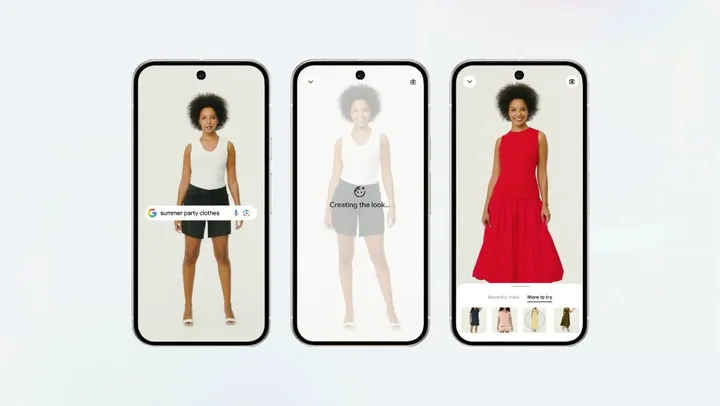
Virtual try-on
Google is expanding virtual try-on for apparel. Eligible products can receive the relevant marker in free product listings and product ads. The Merchant Center documentation is specific: a supported apparel category, an image of at least 512 by 512 pixels (ideally above 1024), and one garment shown in full, without hands, accessories, or wrinkles covering details [3].
That is a clear example of how technical image requirements stopped being about aesthetics and became a condition for accessing a feature.
Your Merchant Center feed is now your most important SEO asset
In AI-driven shopping results, the product feed does a lot of the work that category pages used to do in classic SEO.
Merchant Center uses product attributes to understand what you sell, match products to queries, and show correct details in ads and free listings. When that data is incomplete or wrong, Google flags issues in Merchant Center and ads may not serve [4].
Attributes that matter most
| Attribute | Why it matters |
|---|---|
| Product title | The first thing Google reads. It should include brand, product type, and the main differentiating trait |
| Description | Adds context: use case, features, material, fit, compatibility, audience |
| GTIN, brand, MPN | Identify the exact product and link it to the same item from other sellers |
| Price | Must match the landing page and stay current |
| Availability | Tells Google whether the product is in stock, out of stock, preorder, or backorder |
| Image link | The main image in ads and free listings. Google recommends high resolution, around 1500 by 1500 pixels or higher |
| Category and product type | Classify the product and place it in results |
| Color, size, material, gender, age group | Drive matching for more detailed queries, especially in fashion, home, and accessories |
| On-page structured data | Helps Google connect the product page with Merchant Center data |
Conversational attributes
In May 2026, around Google Marketing Live, Google added six optional attributes described explicitly as conversational. They help AI Mode, Gemini, and Business Agent understand the product in natural language [5].
| Attribute | What it describes |
|---|---|
| question_and_answer | Answers to product questions, stored as question-and-answer pairs |
| related_product | Links to other products in the catalog: accessories, spare parts, substitutes |
| document_link | Links to documents such as manuals, catalogs, or specifications |
| item_group_title | A shared title for a variant group, used with item_group_id |
| variant_option | Traits that distinguish a variant, stored as name-and-value pairs |
| popularity_rank | The product's popularity position in your catalog, as a percentage |
In practice, start with the first three. Question and answer, related product, and document link did not exist in a standard feed at all, so they carry information Google cannot invent elsewhere. The other three refine things already covered by item_group_id, color, and size, so they can wait.
It is worth separating two field groups, because they are easy to confuse. Product highlight and product detail are not conversational attributes, even though Google reads them. Google also says not to duplicate content: if a fact is already in the description, product highlight, or product detail, do not repeat it in conversational attributes.
All six fields are optional, and adding them does not change approval status for products already in Merchant Center. Google recommends sending them through a supplemental data source so they stay separate from the primary feed.