
Product A · 20% margin
- Ad cost
- 100 PLN
- Revenue
- 500 PLN
- ROAS
- 5.0
- Gross profit from sales
- 100 PLN
1.0POAS: ads eat the whole profit
Strategy Agent
Snomi splits your catalog into buckets based on Google Ads results and product margins. Labels reach Merchant Center in a supplemental feed, and you can send weak products to content optimization with one click.
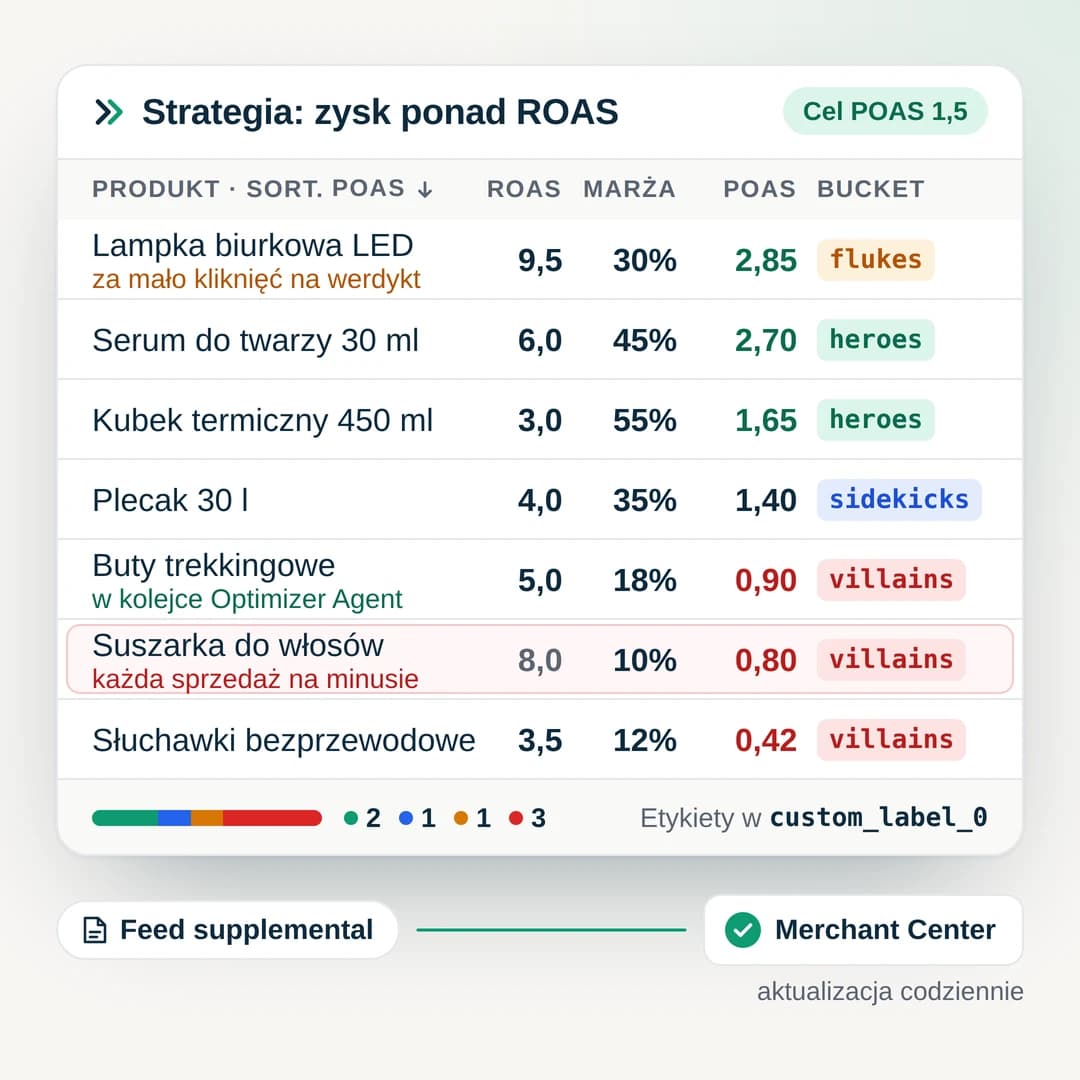
Most accounts follow the same pattern. Google Ads looks fine, but the business keeps less than the report suggests.
tROAS shifts budget to products with the highest revenue per unit of ad spend. A product with ROAS 8 and 10% margin loses money on every sale, yet the algorithm still picks it before a product with ROAS 4 and 40% margin.
To find them you export a report, add costs, and work through a spreadsheet. Few people do that every week, so nobody excludes them.
The account sees revenue, not cost of goods. If a client shares margins, they sit in a sheet with no link to the campaign or the feed.
Which products to carve out, what goal to set for each group, how to keep the split fresh? At that point most analyses end on a slide.
What Google Ads shows
ROAS 5.3
Goal reached
What the business keeps
3 of 6
products sell at a loss
Example: ad cost 5,300 PLN, revenue 28,350 PLN. Profit after ads = revenue × margin − ad cost.
ROAS says how much revenue one unit of ad spend brought in. It does not say how much of that stayed. When you assign margins to the catalog or selected products, Snomi calculates POAS - gross profit per unit of cost - and groups products by it.
1.0POAS: ads eat the whole profit
2.5POAS: 150 PLN left after ads
Snomi was built with experienced product-campaign specialists. We took what works in the best labelizers on the market and added what they were missing.
You assign margins to the whole catalog or filtered product groups. The strategy calculates POAS with no spreadsheet in between.
Snomi sees both campaign results and attribute quality scores. A standalone labelizer only sees the campaign numbers.
You get a ready supplemental feed with labels for Merchant Center. Add its URL once and the labels keep updating on their own.
Pick the shop ad account, including from an MCC.
Clicks, cost, conversions and conversion value, refreshed daily.
Assign a margin to the catalog or selected product groups.
ROAS, CPA or POAS goal. Every product gets a bucket.
Labels in the chosen custom_label reach Merchant Center.
Snomi sets the traffic threshold from your account conversion rate. Villains only get a label with strong evidence, so a few bad days do not cut products out.
Some products sell poorly because the ad says too little about them through weak attribute quality. Snomi sees campaign results and content scores based on Google benchmarks at the same time, so the strategy can flag unprofitable products with weak content and send them to Optimizer Agent. You approve the proposals, and over the next weeks you see whether the product moved up.
Product
Women's hiking boots 38
POAS
0.90
Clicks
640
Content quality
38/100
Title in the feed
Hiking boots 38
Pedora Alpine W, women's waterproof membrane hiking boots, size 38
Added: brand, model, material, use case. Filled product_highlight and question_and_answer.
Live mix, before you save
You set a ROAS, CPA or POAS goal, a margin and a data window. The agent lays out rules for five buckets, and you see the catalog mix live before you save anything.
When
Then
custom_label_4 = unprofitable_content
A WHEN / THEN rule editor. You combine campaign metrics, product attributes and Snomi fields, such as content quality score, into condition groups with AND and OR logic.
3 rules ready to review
Margin > 40% and clicks < 50 → margin_test
You describe in plain words what you want, and the assistant builds a rule set to review and edit. It costs 50 AI credits from your plan pool.
Labels steer budget, so every change is visible and reversible.
See which products will change bucket before labels hit the feed.
The strategy calculates labels without writing to the feed until you decide it works.
Data and labels refresh daily. How often Merchant Center fetches the feed is up to you.
If Google Ads data does not arrive, the last labels stay and products do not drop wholesale into Zombies.
Snomi shows which custom_label slots are taken and will not let two strategies write to the same one.
Every run records how many products changed bucket, so you know what happened and when.
included
Google Ads integration, Metrics and Strategies with no extra fee.
+99 PLN / mo
An add-on to your plan, billed with the subscription.
Connect Google Ads, assign margins and see which products truly make money.